
Internet Service
Fixed Wireless Internet
High-speed internet with no data caps. Speeds up to 100 Mbps.
Apply for Service
No Data Caps
Fixed Wireless Internet Service
DNA Mobility provides fixed wireless internet for select locations, delivering speeds up to 100 Mbps up and down with no data caps. Service requires a clear line of sight to the tower, and self-installation kits are available so you can get online quickly.
Service Details
| Feature | Details |
|---|---|
| Speeds | Up to 100 Mbps up and down |
| Data caps | None |
| Installation | Self-install kit available — includes everything you need to get set up |
| Hardware kit | From $256.00 + tax (LTU outdoor radio, router, cables, POE injector, activation) |
| POE injector (optional) | 9-36V DC input (battery & solar compatible) — purchased separately if needed |
| Additional cabling (optional) | Longer runs available separately if needed |
| Requirements | Clear line of sight to the tower |
Coverage & Lot Map
Tower locations and campsite lot numbers for the Tolna Bay Campground area. Zoom in to find the tower with the clearest line of sight to your site. Service requires a clear line of sight to a tower.
Service Plans
Summer Season
- Internet 100 (up to 100 Mbps)
- No data caps
- 6-month seasonal plan
- Self-install kit available
Winter Season
- Internet 100 (up to 100 Mbps)
- No data caps
- 6-month seasonal plan
- Self-install kit available
Annual
- Internet 100 (up to 100 Mbps)
- No data caps
- 12-month annual plan
- Best value
- Self-install kit available
Frequently Asked Questions
Service details, kit installation, connecting your devices, and troubleshooting.
Service & Coverage
Our fixed wireless internet delivers speeds up to 100 Mbps download and upload, with no data caps.
Service is available in the Tolna Bay Campground area and requires a clear line of sight to one of our tower radio locations. See the coverage area map above, or contact us to confirm availability at your site.
Plans are $180.00 for a 6-month season (summer or winter) or $360.00 for the full year. The self-install hardware kit starts at $256.00 plus tax. See the Service Plans above, or sign up to get started.
Yes. If you sell your camper, you can include the DNA equipment in the sale, and the new owner can activate service with DNA Mobility in their own name — there’s no need to buy a new kit.
When the new owner signs up, they should check “I already have the equipment” and provide the previous owner’s name (and the modem number, in the format Tjs-Tolna-AirCube###, if available) so we can transfer the service.
Equipment & Installation
Your self-install kit includes:
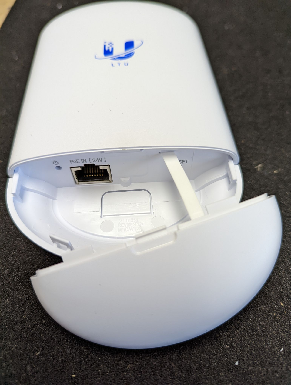
- (1) LTU Outdoor Radio
- (1) Mounting hardware (bracket, zip tie, screws)
- (1) PoE injector
- (1) Indoor router / access point
- (1) 10 ft Cat 6 cable
- (1) 25 ft Cat 6 cable
The kit is designed for self-installation:
- Mount the outdoor radio. Using the included hardware, mount the LTU Outdoor Radio outside with a clear line of sight to one of our tower radios (telephone poles at the bin site, mid-campground, or the south entrance). Point the front of the radio — the side with the U / LTU logo — toward the pole with the best view from your camper.
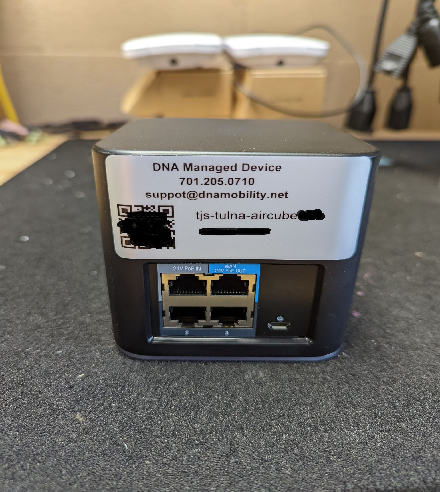
- Run the outdoor cable. Run the 25 ft Cat 6 cable from the radio to the WAN / 24V PoE Out port on the indoor router / access point.
- Connect the PoE injector. Connect the 10 ft Cat 6 cable from the PoE side of the injector to the 24V PoE In port on the router. Plug the injector into a wall outlet — it powers both the router and the outdoor radio.
- Power up. Allow a couple of minutes for the equipment to boot and link to the tower.
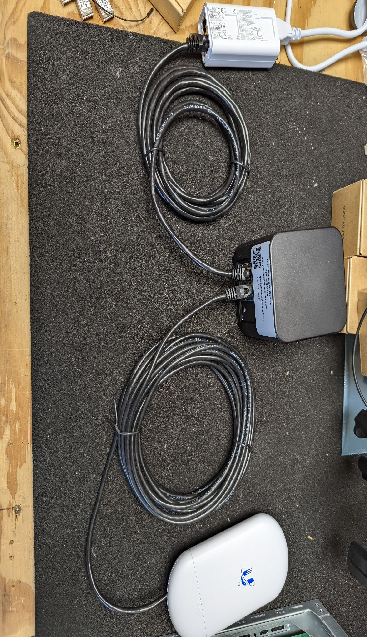
WiFi: Scan the 2D barcode on the bottom of the router/access point — it contains your network name (SSID) and password. Your SSID will be airCube-XXX (the last characters of the unit’s MAC), and the WiFi password is the value on the WPA2: line. The SSID is also printed on a sticker on the unit.
Wired: The router has two open Ethernet ports (ports 2 and 3) for wired devices. You can also use the LAN side of the PoE injector.
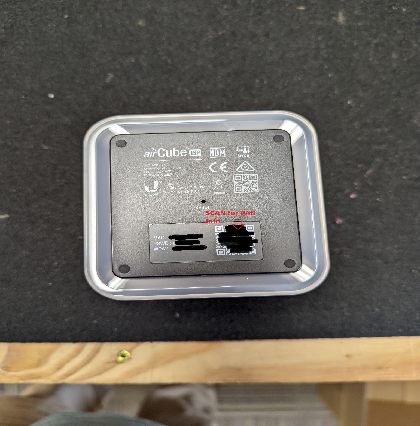
Manage your account at uisp.dnamobility.net. Your username is the email address you used to sign up.
Troubleshooting & Support
- Power: Make sure the PoE injector is plugged into a working outlet and the router has lights on.
- Cables: Confirm the outdoor radio cable is in the WAN / 24V PoE Out port and the injector cable is in the 24V PoE In port.
- Reboot: Unplug the PoE injector from the wall, wait about 30 seconds, then plug it back in. Allow 2–3 minutes to reconnect.
- Aim: Check that the outdoor radio still has a clear line of sight to the tower pole and has not shifted.
If you still have no connection, contact support below.
- Make sure the outdoor radio is still aimed at the tower pole and nothing new is blocking the line of sight (vehicles, branches, etc.). Heavy weather can also reduce performance temporarily.
- Reboot the equipment (unplug the PoE injector for ~30 seconds).
- For WiFi issues, move closer to the router or connect by Ethernet to confirm whether it’s the WiFi signal or the internet connection.
- Confirm you’re joining the right network — airCube-XXX — and entering the password from the WPA2: line on the barcode/sticker.
- Try a wired connection to port 2 or 3 to confirm the internet is working.
- Reboot the router (unplug the PoE injector for ~30 seconds).
Unplug the PoE injector from the wall outlet, wait about 30 seconds, then plug it back in. This power-cycles both the router and the outdoor radio. Allow 2–3 minutes for everything to reconnect.
Contact DNA Mobility support at [email protected] or (701) 205-0710. You can also check live network status at status.dnamobility.net.
Already a DNA Mobility customer?
Manage your service, usage, and account in the ISP customer portal.
Open ISP Portal